Skeet Project Description
Overview
Use your knowledge of object-oriented programming to write a basic target shooting game.
This project will use the same arcade library as the previous project. Please refer to that project for instructions about configuring your environment.
Instructions
Your assignment is to create a game that simulates skeet shooting. On the left side of the screen, clay pigeons, or targets are randomly thrown across the screen. On the bottom left corner of the screen, the "marksman" (the term is used very loosely here) aims the rifle. The object of the game is to hit the intended targets, and not other "safe" ones.
The following shows the game in action:
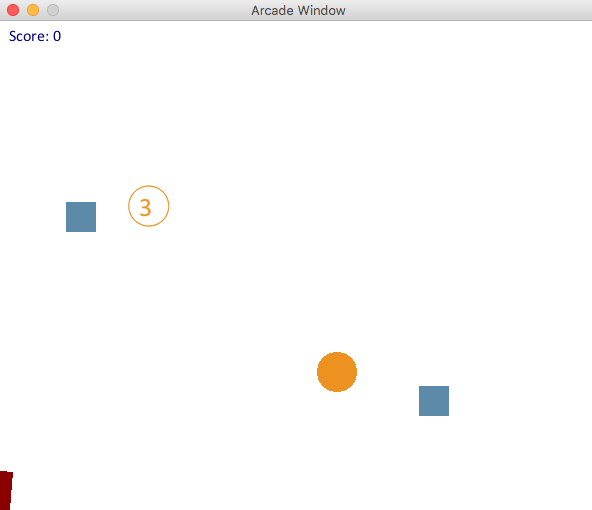
Game Rules and Specification
When there is no pigeon on the screen, a new one is created with a 1/50 probability.
To make it more of a challenge, there are three types of pigeons:
Standard Target
Rendered as a circle with a 20px diameter.
Destroyed with one hit.
1 point is awarded for hitting it.
Use the
arcade.draw_circle_filledto assist you.Strong Target
Rendered as a circle with a number inside of it.
The strong target should move more slowly than the others as defined below.
It takes 3 hits to destroy this target.
1 point is awarded for each of the first two hits.
5 points are awarded for the third hit that destroys the target.
Safe Target
Rendered as a square.
Use the
arcade.draw_rectangle_filledfunction to assist you.This target should not be hit.
It is destroyed with a single hit.
A penalty of 10 points is incurred if this target is hit.
The target type, direction, velocity, and timing to release (delay) are random according to the following constraints:
The initial position of the target is anywhere along the top half of the left side the screen.
The horizontal component of the velocity should be between 1 and 5 pixels/frame.
The vertical component of the velocity should be between -2 and +5 pixels/frame.
To give the user a greater chance to hit the strong target, it should move more slowly than the others. In particular, its horizontal velocity should be taken from the range: 1 to 3, and it's vertical velocity from the range -2 to +3.
New targets should be created in the "update" function with 1/50 probability. This can be achieved by drawing a random number from 1 to 50 and checking if it's 1.
There is no limit to the number of targets that can be on the screen at a time, but they should be removed from the game when they leave the screen.
Rifle
Rendered as a rectangle.
The aim is controlled to match the mouse cursor.
Bullets
Rendered as a filled-in circle.
There is no limit to the number of bullets.
Clicking the mouse fires a new bullet.
New bullets should be aimed in the direction of the rifle.
Bullets travel at 10 pixels/frame at that angle at which they are fired.
Bullets should be removed if they leave the borders of the screen.
Working with the Instructor
As with the last project, in order to help you stay focused on the most pertinent parts of the assignment, and to also help understand the value of agreeing upon an interface for your classes, you will again be working on a team comprised of you and the instructor.
As before, please recognize that other students in different sections, or different semesters may not be working in this way, so please DO NOT share the code you are receiving.
For this project the instructor will provide the Rifle class and most of the logic in the Game class. For the Game class, you will be provided with the logic of moving the rifle, creating, advancing, and cleaning up bullets, and also checking for collisions.
You are responsible to implement the following:
The
BulletclassClasses for the various types of targets
A base class for flying objects
In the game class: creating, storing, drawing and advancing the targets. (Hint: look for the "TODO" comments in the game class.)
Provided you correctly implement the methods and data members for targets and bullets, the collision detection and keeping of the game score will be taken care of for you.
The game class expects the following interface to be present for targets and bullets:
| Bullet |
|---|
| center : Point |
| velocity : Velocity |
| radius : float |
| __init__() |
| +advance() : None |
| +draw() : None |
| +is_off_screen(screen_width, screen_height) : Boolean |
| +fire(angle:float) : None |
| Target |
|---|
| center : Point |
| velocity : Velocity |
| radius : float |
| alive : Boolean |
| +__init__() |
| +advance() : None |
| +draw() : None |
| +is_off_screen(screen_width, screen_height) : Boolean |
| +hit() : int |
The hit() method for the Target represents the target being hit and should either kill the target (or decrement the number of hits remaining for the strong target) and return an integer representing the points scored for that hit.
Getting Started
You will use the same framework and library that you used for Pong, plus the Skeet specific classes from the instructor's half. You can copy this file from: skeet.py.
Architectural Design
For this project, you will be expected to use the principles of inheritance and polymorphism. These are the topics we will be studying over the next two weeks.
In order to demonstrate correct use of these design principles, in your game class, the targets should all be put in the same list and then treated "identically" throughout the game code. In other words, it should not have a separate list for each type of target.
Code hints and suggestions
Start by creating all the classes you need with the correct data members and blank methods. Then, you can go through and fill in the methods one by one.
You can get a random float from a range as follows:
import random

...

random.uniform(-2, 2)
Trig functions (sin, cos, tan) will likely be helpful in determining the x and y components of an angle. They can be found in the math library and used as follows. (Note that these fucntions expect radians rather than degrees, and there are handy functions to convert between them.)
import math // used for sin, cos, and M_PI
...
speed = 10
angle = 60

dx = math.cos(math.radians(angle)) * speed
dy = math.sin(math.radians(angle)) * speed
You can draw a circle with a number inside it with code similar to this:
arcade.draw_circle_outline(self.center.x, self.center.y, self.radius, TARGET_COLOR)
text_x = self.center.x - (self.radius / 2)
text_y = self.center.y - (self.radius / 2)
arcade.draw_text(repr(self.lives), text_x, text_y, TARGET_COLOR, font_size=20)
You are encouraged to work together and help one another on this assignment!
Assignments
You have two weeks to complete this project, with a milestone submission due at the end of the first week. Please note that this is a challenging project that will require you to apply several new and challenging topics.
This project will be broken up into the following assignment submissions:
For simplicity, for this assignment, you are welcome to put all of your classes in the same .py file.
Expectation to Excel
As explained in more detail in the project link above, the requirements presented here are simply a base standard. To receive up to 100% on this assignment you are expected to show creativity and excel above and beyond what is specifically required.